Why UTM Parameters Disappear During Redirects (And How to Fix It)
Learn why redirects strip UTM query strings, how to diagnose the issue across every platform, and fix it permanently with platform-specific solutions.
The Attribution Black Hole
You launch a Facebook ad campaign. $5,000 budget. Clean UTM parameters:
utm_source=facebook&utm_medium=paid_social&utm_campaign=spring_sale_2026
You click the ad yourself to test. The URL bar shows your UTMs. Perfect.
Then the page finishes loading. You look at the URL bar again.
The UTMs are gone.
You check GA4 Realtime. Your session shows as "Direct / (none)" instead of "facebook / paid_social".
Your campaign? Completely untrackable.
You didn't make a tagging mistake. Your redirect configuration did.
According to analysis of UTM tracking failures, redirect issues cause 40% of all UTM tracking problems. Yet most marketing teams don't know how to diagnose or fix them.
This guide shows you exactly why redirects strip UTM parameters, how to identify if this is your problem, and how to fix it permanently across every platform you use.
Quick Navigation
Need to fix this right now? Jump to your platform:
- ⚠️ Trailing slash trap - The invisible redirect you don't know is happening
- 🔧 WordPress redirects - Plugins and .htaccess fixes
- ☁️ Cloudflare/CDN issues - Cache and page rules
- 📧 Email platform redirects - ESP click tracking settings
- 🔗 URL shorteners - Bitly, TinyURL, custom shorteners
- 💻 JavaScript redirects - Client-side redirect fixes, landing page builders
- 🧪 Testing redirect chains - Diagnostic tools and methods
New to this issue? Start from the beginning to understand why this happens.
Table of Contents
- Understanding Redirects and Query Parameters
- Diagnosing Redirect Issues (The 3-Minute Test)
- The "Trailing Slash" Trap (Hidden Redirect)
- WordPress Redirect Solutions
- Cloudflare and CDN Configuration
- Managed Hosting Platforms
- URL Shortener Configuration
- Email Platform Click Tracking
- Server-Side Configuration
- JavaScript and Client-Side Redirect Fixes
- Testing Your Redirect Chain
- Prevention Checklist
Understanding Redirects and Query Parameters
Before we fix the problem, let's understand why it happens.
What Are Query Parameters?
Query parameters are the part of a URL after the ? symbol:
https://example.com/landing?utm_source=facebook&utm_medium=paid_social
                          ↑
                    Everything after this is a query parameter
UTM parameters are query parameters. When redirects strip query parameters, your UTM tracking disappears.
Why Redirects Strip Query Parameters
The technical reason: Most redirect methods specify only the destination path, not the full URL with query string.
Example of the problem:
User clicks:  https://example.com/promo?utm_source=facebook
Redirect to:  https://example.com/landing
               ↑ Notice: No query string

Result: UTM parameters lost
What should happen:
User clicks:  https://example.com/promo?utm_source=facebook
Redirect to:  https://example.com/landing?utm_source=facebook
               ↑ Query string preserved

Result: UTM parameters tracked in GA4
🎯 Key Insight
Redirects don't intentionally "strip" parameters—they simply don't include them unless explicitly configured to do so. By default, most redirect methods only specify the destination path, not the full URL with query string.
Types of Redirects (And Which Strip Parameters)
Not all redirects are created equal. Here's what you need to know:
1. Server-Side Redirects (301, 302, 307, 308)
How they work: Server receives request, sends back redirect header
Default behavior: Strips query parameters (unless configured with QSA flag or equivalent)
Most common in:
- WordPress redirect plugins
- .htaccess rules
- Nginx configuration
- Hosting platform rules
GA4 impact: Parameters never reach analytics—lost at server level
2. Meta Refresh Redirects
How they work: HTML <meta> tag tells browser to redirect
<meta http-equiv="refresh" content="0;url=/new-page">Default behavior: Often strips query parameters
Most common in:
- Old CMS systems
- Basic HTML redirects
- Some email platforms
GA4 impact: Parameters lost before GA4 tag loads
3. JavaScript Redirects
How they work: JavaScript code changes window.location
window.location.href = '/new-page';Default behavior: Strips query parameters unless explicitly coded to preserve them
Most common in:
- Single Page Applications (SPAs)
- Custom landing pages
- Marketing automation platforms
GA4 impact: Timing-dependent; GA4 may load before redirect if slow
4. The "Trailing Slash" Trap (Silent Redirect)
How it works: Server enforces trailing slash consistency
User clicks:  example.com/page?utm_source=facebook
Server sees:  Missing trailing slash
Redirects to: example.com/page/
Result:       UTMs dropped in the redirect
Why this is sneaky: You don't realize a redirect is happening. The URL looks "close enough."
Default behavior: Strips query parameters unless server is configured to preserve them
Most common in:
- WordPress default permalink settings
- Apache with mod_dir enabled
- Nginx with trailing slash enforcement
- Some CDNs with URL normalization
GA4 impact: Parameters lost during the "invisible" redirect—you never see it happen
⚠️ Critical: The Most Common Hidden Redirect
Trailing slash redirects are responsible for ~25% of UTM tracking failures. They're invisible in the browser—the URL changes so quickly you don't notice. Always test both with AND without trailing slashes.
5. Email Platform Click Tracking
How they work: ESP intercepts click, tracks it, then redirects
Click:     https://example.com/promo?utm_source=email
Redirect:  https://track.mailchimp.com/click/...
Redirect:  https://example.com/promo
            ↑ UTMs gone
Default behavior: Varies by platform; some preserve, some strip
Most common in:
- Mailchimp
- HubSpot
- Constant Contact
- SendGrid
GA4 impact: Parameters lost during ESP redirect chain
Redirect Chain Visualization
Here's what a typical redirect chain looks like:
(click to enlarge - right click to open in a new tab)
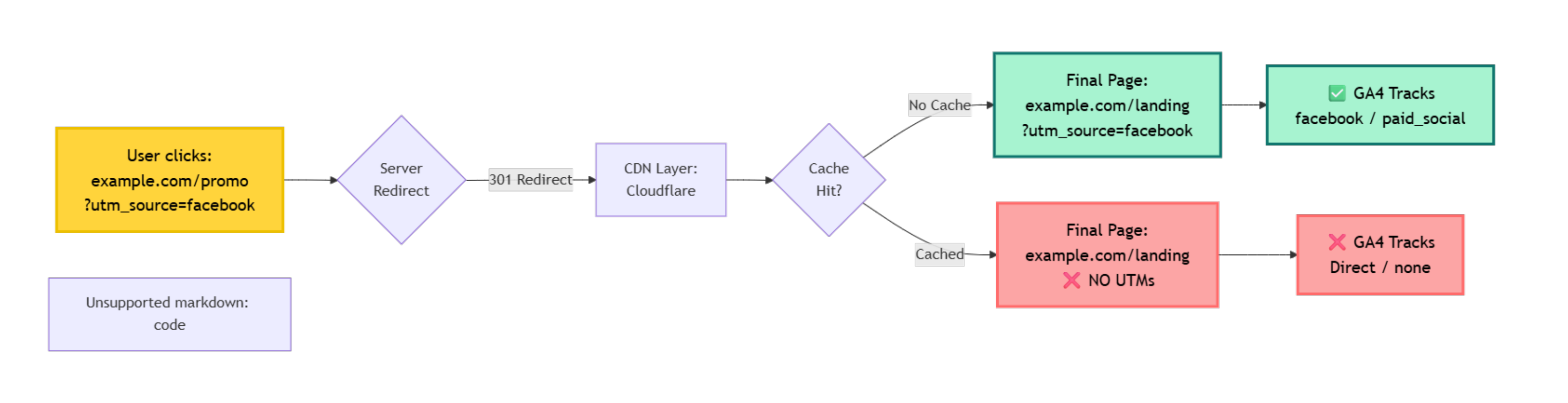
The problem: UTM parameters can be lost at ANY step in this chain.
📍 Progress Check (25%): You now understand why redirects strip parameters. Next: how to diagnose if this is your problem in 3 minutes.
Diagnosing Redirect Issues (The 3-Minute Test)
Before fixing anything, confirm redirects are actually the problem.
The Simple Browser Test
Step 1: Click your campaign URL
Click the actual link from your campaign (Facebook ad, email, etc.)
Step 2: Watch the address bar
Pay close attention as the page loads. Watch the URL in the address bar.
Step 3: Check for UTM parameters
After the page fully loads, look at the final URL.
What you're looking for:
✅ Good: UTMs present in final URL
https://example.com/landing?utm_source=facebook&utm_medium=paid_social
❌ Problem: UTMs disappeared
https://example.com/landing
Quick Diagnosis Matrix
| What You See | What It Means | Next Step |
|---|---|---|
| UTMs in URL, appearing in GA4 | ✅ Everything working | No action needed |
| UTMs in URL, NOT in GA4 | GA4 configuration issue | See GA4 troubleshooting |
| UTMs disappear from URL | ⚠️ Redirect issue | Continue with this guide |
| URL changes completely | ⚠️ Redirect issue | Continue with this guide |
The Redirect Checker Tool Method
Use a redirect checker to see the full chain:
Free tools:
- Redirect Detective (redirectdetective.com)
- WhereGoes (wheregoes.com)
- Redirect Checker (httpstatus.io)
How to use:
- Paste your full campaign URL (with UTMs)
- Click "Check Redirects"
- Look at each hop in the chain
- Identify where UTMs disappear
Example output:
Hop 1: https://example.com/promo?utm_source=facebook
  ↓ 301 Redirect
Hop 2: https://www.example.com/promo?utm_source=facebook
  ↓ 301 Redirect
Hop 3: https://www.example.com/landing
       ↑ UTMs lost here!
💡 Pro Tip: Test the Full User Journey
Don't just test in your browser. Test how users will actually experience it:
- Click from actual Facebook ad preview
- Click from test email in Gmail, Outlook, Apple Mail
- Test on mobile devices (iOS Safari, Android Chrome)
- Use incognito/private browsing to avoid cache
GA4 Realtime Validation
After clicking your campaign link:
- Open GA4 → Reports → Realtime
- Look at the event stream
- Check the session source/medium
What you should see:
✅ If redirects work: facebook / paid_social
❌ If redirects strip UTMs: (direct) / (none)
If you see Direct instead of your campaign source, you have a redirect issue.
WordPress Redirect Solutions
WordPress is the most common platform where redirects strip UTMs. Here's how to fix it.
Problem 1: Redirect Plugins Stripping Parameters
Common culprits:
- Redirection plugin
- Yoast SEO Premium
- Rank Math
- Simple 301 Redirects
The fix: Enable query string preservation.
Redirection Plugin Fix
Step 1: Go to Tools → Redirection in WordPress admin
Step 2: Find your redirect rule (e.g., /promo → /landing)
Step 3: Click Edit on the redirect
Step 4: Under "Match," change from "URL only" to "URL and query parameters"
Alternative method:
- In redirect settings, enable "Pass query parameters"
- Save the redirect
- Test the URL
Testing:
Before:  yourdomain.com/promo?utm_source=test
After:   yourdomain.com/landing?utm_source=test ✅
Yoast SEO Premium Fix
Step 1: Go to SEO → Redirects
Step 2: Find your redirect
Step 3: Enable "Preserve query parameters" toggle
Step 4: Save
Rank Math Fix
Step 1: Go to Rank Math → Redirections
Step 2: Edit your redirect
Step 3: Enable "Forward Query Strings" option
Step 4: Update redirect
Problem 2: .htaccess Redirects
If you're using Apache and have redirects in your .htaccess file, you need to add the [QSA] flag.
The problem:
# This strips query parameters
RewriteRule ^promo$ /landing [R=301,L]
The fix:
# This preserves query parameters
RewriteRule ^promo$ /landing [R=301,L,QSA]
                              ↑ Query String Append flag
What the flags mean:
R=301= 301 redirectL= Last rule (stop processing)QSA= Query String Append (preserve parameters)
Common patterns:
# Redirect with UTM preservation
RewriteRule ^old-page$ /new-page [R=301,L,QSA]

# Redirect with www enforcement and UTM preservation
RewriteCond %{HTTP_HOST} !^www\.
RewriteRule ^(.*)$ https://www.%{HTTP_HOST}/$1 [R=301,L,QSA]

# Force HTTPS with UTM preservation
RewriteCond %{HTTPS} off
RewriteRule ^(.*)$ https://%{HTTP_HOST}%{REQUEST_URI} [R=301,L,QSA]
⚠️ Warning: .htaccess Edits
Always backup your .htaccess file before editing. One typo can break your entire site. If you're not comfortable editing it, ask your hosting support or developer.
Problem 3: WordPress Page Redirects
Some WordPress themes or page builders have built-in redirect functionality.
Check:
- Elementor → Settings → Redirects
- Divi → Page Settings → Redirect
- Beaver Builder → Advanced → Redirect
- Genesis → Page Settings → Redirect
The fix: Look for a "preserve query parameters" or similar option. If none exists, use a dedicated redirect plugin instead.
Cloudflare and CDN Configuration
Cloudflare and other CDNs can strip UTM parameters, especially with caching rules.
Problem 1: Cloudflare APO (Automatic Platform Optimization)
What happens: APO caches pages aggressively. Cached pages may not include query parameters.
The fix:
Step 1: Log into Cloudflare dashboard
Step 2: Go to Speed → Optimization → Automatic Platform Optimization
Step 3: Create a cache bypass rule for UTM parameters
Step 4: Go to Rules → Page Rules
Step 5: Create a new page rule:
URL Pattern: *utm_source=*

Settings:
- Cache Level: Bypass
Result: Pages with UTM parameters won't be served from cache, preserving parameters.
Problem 2: Cloudflare Page Rules Redirects
If you're using Cloudflare Page Rules for redirects:
The problem:
URL: example.com/promo
Redirect: https://example.com/landing
This strips query parameters.
The fix:
Use Cloudflare's Bulk Redirects instead, which preserve query strings by default.
Or: Use wildcard redirect with query string:
URL: example.com/promo*
Redirect: https://example.com/landing$1
The * and $1 capture and forward query strings.
Problem 3: Other CDN Services
Fastly, CloudFront, KeyCDN, etc.
General approach:
- Check cache settings
- Look for "query string forwarding" or "preserve query parameters" options
- Enable for all cached content
- Purge cache after changes
Managed Hosting Platforms (WP Engine, Kinsta, etc.)
Managed hosting platforms often have their own caching layers that can affect UTM parameters.
WP Engine
Problem: Aggressive caching can strip query parameters
The fix:
Option 1: Contact Support Ask WP Engine support to add UTM parameters to your cache exclusion list.
Option 2: Use Cache Exclusion Rules
In your wp-content/mu-plugins/ folder, add:
<?php
// Exclude UTM parameters from cache
function exclude_utm_from_cache() {
    if (isset($_GET['utm_source']) ||
        isset($_GET['utm_medium']) ||
        isset($_GET['utm_campaign']) ||
        isset($_GET['utm_content']) ||
        isset($_GET['utm_term'])) {
        header('Cache-Control: no-cache');
    }
}
add_action('template_redirect', 'exclude_utm_from_cache');
Result: Pages with UTM parameters won't be cached.
Kinsta
Problem: Similar caching issues
The fix:
Step 1: Add query string to cache exclusion
Go to MyKinsta → Sites → [Your Site] → Tools → Cache
Step 2: Add to "Never cache the following URLs"
*utm_source=*
*utm_medium=*
*utm_campaign=*
Step 3: Clear cache
Flywheel
The fix:
Contact Flywheel support and request UTM parameters be added to cache bypass rules. They can configure this at the server level.
URL Shortener Configuration
URL shorteners add another redirect layer. Most modern shorteners preserve parameters, but configuration matters.
Bitly
Default behavior: Preserves query parameters ✅
Potential issue: If you paste a shortened URL into another platform that also shortens, parameters may be lost.
Testing:
- Create shortened link:
bit.ly/spring-sale - Test with parameters:
bit.ly/spring-sale?utm_source=test - Verify parameters appear in final destination
If parameters are stripped:
- Check Bitly dashboard → Link → Edit → "Forward query string" is enabled
- Contact Bitly support if issue persists
TinyURL
Default behavior: Preserves query parameters ✅
No configuration needed - works out of the box.
Custom URL Shorteners
If you're using a custom domain shortener (e.g., go.yourcompany.com):
Check your redirect configuration:
If using YOURLS (popular open-source shortener):
- Edit
includes/functions.php - Ensure redirect function includes query string:
$redirect_url = yourls_get_keyword_longurl($keyword);
if ( ! empty( $_SERVER['QUERY_STRING'] ) ) {
    $redirect_url .= '?' . $_SERVER['QUERY_STRING'];
}
yourls_redirect( $redirect_url, 301 );
If using Rebrandly, Short.io, or similar service:
- Check dashboard settings for "forward query parameters"
- Enable if available
- Contact support if not
📍 Progress Check (50%): You've learned platform-specific fixes for WordPress, CDNs, hosting, and shorteners. Next: email platform click tracking issues.
Email Platform Click Tracking
Email Service Providers (ESPs) add their own redirect layer for click tracking. This is a common source of UTM parameter loss.
How Email Click Tracking Works
(click to enlarge - right click to open in a new tab)
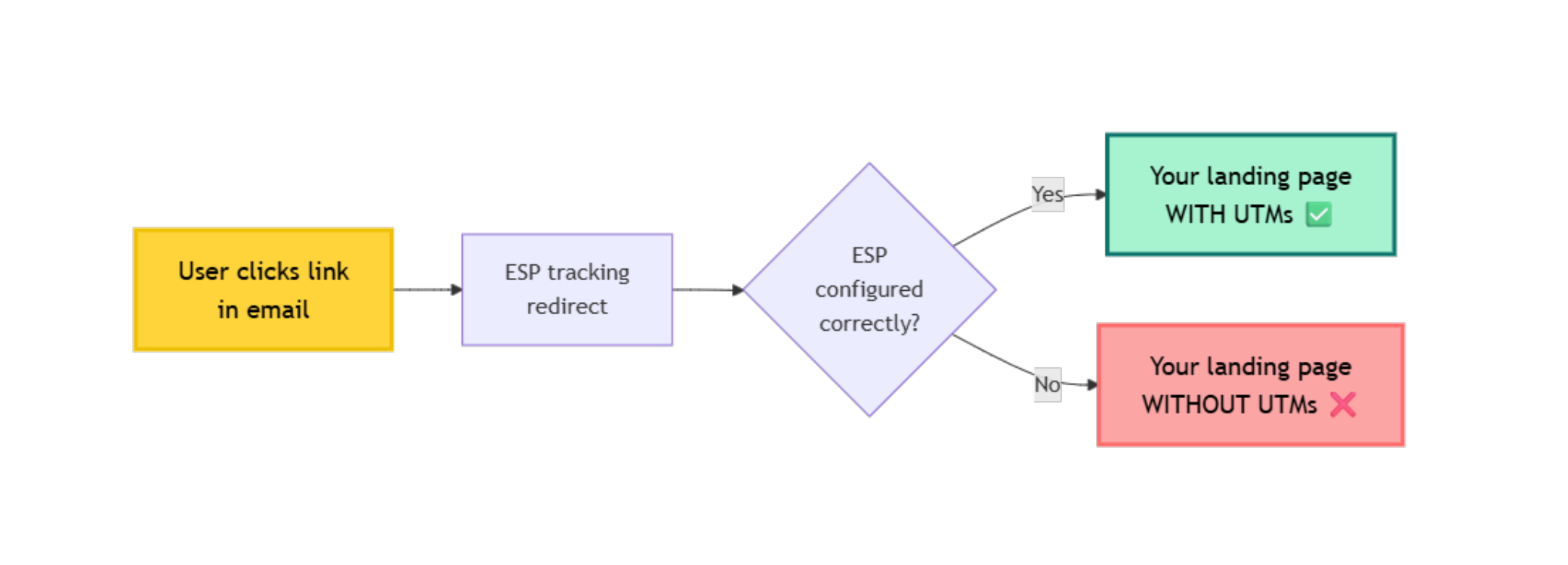
The problem: The ESP's redirect may not forward your original UTM parameters.
Mailchimp
Step 1: Go to Account → Settings → Tracking
Step 2: Scroll to "Click Tracking" section
Step 3: Ensure "Track clicks and opens" is enabled
Step 4 (CRITICAL): Under advanced settings, check if there's an option for "Preserve query parameters"
If no such option exists:
Mailchimp should preserve parameters by default. If they're being stripped:
- Check if you're using merge tags in URLs (can cause issues)
- Avoid putting UTM parameters in merge tags
- Use static UTM values in links
Example:
❌ Bad: https://example.com/page?utm_source=*|SOURCE|*
✅ Good: https://example.com/page?utm_source=newsletter&utm_medium=email
HubSpot
Step 1: Go to Settings → Marketing → Email
Step 2: Under "Email Tracking," find "Link Tracking"
Step 3: Ensure "Track email opens and clicks" is enabled
Step 4: Check "Preserve query parameters in tracked links" is enabled
If this option doesn't exist:
HubSpot automatically preserves query parameters in most cases. If issues persist:
- Test without link shortening
- Contact HubSpot support
- Use HubSpot's UTM builder which ensures compatibility
Constant Contact
Problem: Known to sometimes strip UTM parameters with click tracking.
The fix:
- Use tracked links (don't disable tracking)
- Test thoroughly before sending
- If parameters are stripped, contact support
Workaround: Use a URL shortener BEFORE adding to Constant Contact. The shortener preserves parameters, then Constant Contact tracks the shortened URL.
Original: example.com/page?utm_source=newsletter
Shortened: bit.ly/abc123 (preserves parameters)
In Constant Contact: bit.ly/abc123
Final click: example.com/page?utm_source=newsletter ✅
SendGrid
Generally preserves parameters by default.
If experiencing issues:
- Check if using SendGrid's click tracking
- Verify in SendGrid dashboard: Settings → Tracking
- Ensure "Click Tracking" is enabled
- Test with a sample email
ActiveCampaign
Step 1: Go to Settings → Advanced → Link/Domain Settings
Step 2: Ensure "Enable Google Analytics Link Tracking" is OFF
(This adds its own UTM parameters which can conflict with yours)
Step 3: Use your own UTM parameters in links
Step 4: Test that parameters survive the tracking redirect
Gmail, Outlook "Safe Links"
Important: Some email clients add their own security layer.
Microsoft Outlook Safe Links:
Original: example.com/page?utm_source=email
Safe Link: safelinks.protection.outlook.com/?url=...
Final: example.com/page?utm_source=email
Generally preserves parameters, but adds significant redirect delay (1-2 seconds).
No fix needed - parameters usually survive, but:
- Adds extra hops to redirect chain
- May confuse some analytics tools
- Users may see the
safelinks.protection.outlook.comdomain briefly
Gmail Link Protection:
Similar to Outlook, but less common. Usually preserves parameters.
Server-Side Configuration (Apache, Nginx)
For advanced users managing their own servers.
Apache (.htaccess)
We covered basic redirects earlier. Here are more advanced patterns:
Pattern 1: Conditional redirect with query string preservation
# Redirect old domain to new domain, preserve everything
RewriteCond %{HTTP_HOST} ^olddomain\.com$ [NC]
RewriteRule ^(.*)$ https://newdomain.com/$1 [R=301,L,QSA]
Pattern 2: Redirect specific page, preserve query string
# Redirect /promo to /landing with UTMs intact
RewriteRule ^promo/?$ /landing [R=301,L,QSA]
Pattern 3: Force trailing slash, preserve query string
# Add trailing slash if missing, keep query string
RewriteCond %{REQUEST_FILENAME} !-f
RewriteCond %{REQUEST_URI} !(.*)/$
RewriteRule ^(.*)$ https://%{HTTP_HOST}/$1/ [R=301,L,QSA]
Pattern 4: WWW to non-WWW (or vice versa), preserve query string
# Redirect www to non-www
RewriteCond %{HTTP_HOST} ^www\.(.*)$ [NC]
RewriteRule ^(.*)$ https://%1/$1 [R=301,L,QSA]
Nginx
Basic redirect with query string preservation:
# Simple redirect
location /promo {
    return 301 /landing$is_args$args;
}
The magic: $is_args$args
$is_args=?if query string exists$args= the actual query string
Without this, query strings are stripped.
Advanced Nginx patterns:
Pattern 1: Redirect old domain to new
server {
    server_name olddomain.com;
    return 301 https://newdomain.com$request_uri;
}
Pattern 2: Specific page redirect
location = /promo {
    return 301 /landing$is_args$args;
}
Pattern 3: Regex-based redirect
location ~* ^/old-(.*)$ {
    return 301 /new-$1$is_args$args;
}
The "Trailing Slash" Trap (Hidden Redirect)
This is the most deceptive redirect issue. You don't realize a redirect is happening.
The Problem
Many servers are configured to enforce consistent URL structure—either all URLs must have trailing slashes, or none can.
What happens:
You link to:  example.com/landing?utm_source=facebook
Server sees:  "This should be example.com/landing/"
Redirects:    example.com/landing/ (UTMs dropped)
Or the reverse:
You link to:  example.com/landing/?utm_source=facebook
Server sees:  "This should be example.com/landing"
Redirects:    example.com/landing (UTMs dropped)
Why it's sneaky: The redirect happens in milliseconds. Your browser shows the final URL so quickly you don't notice the hop.
How to Diagnose
Test 1: Try both versions
Version A: example.com/landing?utm_source=test
Version B: example.com/landing/?utm_source=test
Open both in separate tabs. Watch the address bar closely.
What to look for:
- Does Version A redirect and add a trailing slash?
- Does Version B redirect and remove the trailing slash?
- Do the UTM parameters survive?
Test 2: Use a redirect checker
Paste both versions into Redirect Detective (redirectdetective.com)
Example output showing the problem:
Testing: example.com/landing?utm_source=test

Hop 1: example.com/landing?utm_source=test
  ↓ 301 Redirect (trailing slash enforcement)
Hop 2: example.com/landing/
       ↑ UTMs lost!
WordPress Trailing Slash Fix
WordPress often enforces trailing slashes on pages but not posts.
Option 1: Update WordPress Permalink Settings
- Settings → Permalinks
- Select a structure that matches your link format
- If using pages, ensure your links include trailing slashes
- Save
Option 2: Disable Trailing Slash Enforcement
Add to your theme's functions.php:
// Disable automatic trailing slash redirect
remove_filter('template_redirect', 'redirect_canonical');
⚠️ Warning: This affects SEO. Consult with your developer before disabling.
Option 3: Fix Your Links (Recommended)
Instead of fighting the server configuration, match it:
✅ If server enforces trailing slashes:
   Use: example.com/landing/?utm_source=facebook

✅ If server enforces no trailing slashes:
   Use: example.com/landing?utm_source=facebook
How to check your server's preference:
- Visit
yoursite.com/page(no slash) - Check if it redirects to
yoursite.com/page/ - Match that pattern in your campaign URLs
Apache Trailing Slash Fix
If you control your .htaccess file:
Option 1: Preserve query strings on trailing slash redirects
# Redirect to add trailing slash, preserve UTMs
RewriteCond %{REQUEST_FILENAME} !-f
RewriteCond %{REQUEST_URI} !(.*)/$
RewriteRule ^(.*)$ https://%{HTTP_HOST}/$1/ [R=301,L,QSA]
                                              ↑ QSA preserves UTMs
Option 2: Remove automatic trailing slash redirect
# Disable mod_dir's trailing slash redirect
DirectorySlash Off
⚠️ Warning: This can break some WordPress functionality.
Nginx Trailing Slash Fix
Preserve query strings when enforcing trailing slashes:
# Add trailing slash, preserve query string
location ~ ^/([^/]+)$ {
    return 301 /$1/$is_args$args;
}
The $is_args$args part preserves the query string.
Testing Trailing Slash Behavior
Quick test script:
- Create test URLs:
example.com/page?utm_source=test_no_slash
example.com/page/?utm_source=test_with_slash
-
Click each one
-
Check final URL in address bar
-
Check GA4 Realtime
Results matrix:
| Link Format | Final URL | UTMs Present? | Action Needed |
|---|---|---|---|
| No slash → No slash | example.com/page?utm=... | ✅ Yes | No action needed |
| With slash → With slash | example.com/page/?utm=... | ✅ Yes | No action needed |
| No slash → With slash | example.com/page/ | ❌ No | Fix redirect to preserve UTMs |
| With slash → No slash | example.com/page | ❌ No | Fix redirect to preserve UTMs |
Prevention: Match Your Server Configuration
Step 1: Identify your server's preference
Visit your site and check if trailing slashes are added or removed automatically.
Step 2: Document it
Add to your UTM standards document:
Our server enforces trailing slashes on all page URLs.

✅ Correct format: example.com/landing/?utm_source=facebook
❌ Wrong format:   example.com/landing?utm_source=facebook
                   (will redirect and drop UTMs)
Step 3: Update URL builder
If using a spreadsheet or tool to generate URLs, add trailing slash logic:
IF(page_type = "Page",
   domain & "/" & slug & "/?utm_params",
   domain & "/" & slug & "?utm_params")
Step 4: Test every campaign URL before launch
Add to your pre-launch checklist:
- URL matches server trailing slash configuration
- Tested both with and without slash to confirm no redirect
- UTM parameters visible in GA4 Realtime
JavaScript and Client-Side Redirect Fixes
JavaScript redirects are common in modern web applications, especially SPAs and landing page builders. Unlike server-side redirects, these happen in the browser and are often harder to diagnose.
Problem: Landing Page Builders
Common platforms with JS redirect issues:
- Unbounce
- Instapage
- Leadpages
- ClickFunnels
- Custom landing pages
What happens:
// Typical landing page builder redirect code
// ❌ This strips query parameters
window.location.href = '/thank-you';
When your form submits or after a delay, the page redirects using JavaScript—and drops your UTMs.
Solution: Preserve Query String in JavaScript
Basic fix:
// ✅ This preserves query parameters
window.location.href = '/thank-you' + window.location.search;
Explanation:
window.location.search= everything after?including the?- Concatenating it to the destination preserves UTM parameters
Advanced: URLSearchParams API
For more complex scenarios where you need to modify parameters:
// Get current parameters
const params = new URLSearchParams(window.location.search);

// Optional: Add or modify parameters
params.set('conversion', 'true');

// Redirect with all parameters
window.location.href = '/thank-you?' + params.toString();
Use cases:
- Adding a conversion flag
- Removing sensitive parameters
- Preserving UTMs while changing other parameters
Meta Refresh Redirects
Meta refresh is an older HTML-based redirect method still used by some platforms.
The problem:
<!-- ❌ Strips parameters -->
<meta http-equiv="refresh" content="5;url=/new-page">
The fix:
You can't dynamically modify meta refresh tags easily. Two approaches:
Option 1: Replace with JavaScript redirect
Instead of meta refresh, use:
<script>
  setTimeout(function() {
    window.location.href = '/new-page' + window.location.search;
  }, 5000); // 5 second delay
</script>
Option 2: Server-side redirect
Better: Use a proper 302 redirect at the server level instead of meta refresh.
Framework-Specific Examples
React Router:
import { useNavigate, useLocation } from 'react-router-dom';

function MyComponent() {
  const navigate = useNavigate();
  const location = useLocation();

  const handleRedirect = () => {
    // ✅ Preserve query string
    navigate('/new-page' + location.search);
  };

  return <button onClick={handleRedirect}>Continue</button>;
}
Next.js:
import { useRouter } from 'next/router';

function MyComponent() {
  const router = useRouter();

  const handleRedirect = () => {
    // ✅ Preserve query string
    const queryString = new URLSearchParams(router.query).toString();
    router.push('/new-page?' + queryString);
  };

  return <button onClick={handleRedirect}>Continue</button>;
}
Vue Router:
export default {
  methods: {
    handleRedirect() {
      // ✅ Preserve query string
      this.$router.push({
        path: '/new-page',
        query: this.$route.query
      });
    }
  }
}
jQuery (legacy sites):
// ✅ Preserve query string
var currentParams = window.location.search;
window.location.href = '/new-page' + currentParams;
Client-Side Form Redirects
Problem: Form submissions that redirect via JavaScript
// ❌ Typical form submit handler - drops UTMs
$('#myForm').on('submit', function(e) {
  e.preventDefault();
  // ... form processing ...
  window.location.href = '/thank-you';
});
Fix:
// ✅ Preserve UTMs on form redirect
$('#myForm').on('submit', function(e) {
  e.preventDefault();
  // ... form processing ...
  var params = window.location.search;
  window.location.href = '/thank-you' + params;
});
Delayed Redirects (Timer-Based)
Problem: Landing pages with countdown timers
// ❌ After 10 seconds, redirect without UTMs
setTimeout(function() {
  window.location.href = '/offer';
}, 10000);
Fix:
// ✅ Preserve UTMs on timed redirect
setTimeout(function() {
  window.location.href = '/offer' + window.location.search;
}, 10000);
Testing JavaScript Redirects
Step 1: Check the page source
- Right-click → View Page Source
- Search for
window.location - Check if it includes
.searchor query string handling
Step 2: Use browser DevTools
- Open DevTools (F12)
- Go to Sources tab
- Search in files:
window.location - Check each instance
Step 3: Test with UTM parameters
Visit: yoursite.com/landing?utm_source=test&test=123

After redirect:
✅ Good: yoursite.com/thank-you?utm_source=test&test=123
❌ Bad:  yoursite.com/thank-you (parameters lost)
Landing Page Builder Workarounds
If you can't modify the JavaScript in your landing page builder:
Workaround 1: Use the final destination URL directly
Instead of:
Facebook Ad → Landing page (builder) → Thank you page
Consider:
Facebook Ad → Thank you page (with UTMs)
Skip the middle redirect entirely.
Workaround 2: Pass UTMs to a hidden form field
// On landing page load, capture UTMs
const urlParams = new URLSearchParams(window.location.search);
document.getElementById('utm_source_field').value = urlParams.get('utm_source');
document.getElementById('utm_medium_field').value = urlParams.get('utm_medium');
// ... etc
Then reconstruct UTMs on the thank you page from form submission data.
Warning: Fragment Identifiers (#) and Redirects
⚠️ Critical: The # Symbol Trap
If a URL contains both query parameters (
?) and a fragment identifier (#), the order matters critically.Correct order:
example.com/page?utm_source=facebook#section1
                ↑ UTMs before #
Wrong order:
example.com/page#section1?utm_source=facebook
                          ↑ UTMs after # = GA4 never sees them
Why: Browsers handle everything after
#locally and don't send it to the server. GA4 only sees what's in the query string (between?and#).
Redirect danger with fragments:
If a redirect moves the fragment identifier but doesn't preserve query string order, UTMs can end up after the #:
Original:  example.com/page?utm_source=test#section
Redirect:  example.com/new#section?utm_source=test
                     ↑ UTMs after # = Lost to GA4
How to prevent:
- Always structure URLs with query strings before fragments
- Test redirects to ensure fragment doesn't move before query string
- If using JavaScript redirects, explicitly handle both:
// ✅ Preserve both query string AND fragment in correct order
const search = window.location.search;   // ?utm_source=...
const hash = window.location.hash;       // #section

window.location.href = '/new-page' + search + hash;
// Result: /new-page?utm_source=...#section ✅
📍 Progress Check (75%): You've learned how to fix redirects across every major platform and configuration type. Next: how to test and prevent these issues.
Testing Your Redirect Chain
After implementing fixes, you need to verify they work.
Manual Testing Process
Step 1: Create a test URL
https://yourdomain.com/landing?utm_source=test&utm_medium=test&utm_campaign=test
Step 2: Clear your browser cache
Important! Cached redirects may show old behavior.
Step 3: Click the test URL
Watch the address bar carefully as the page loads.
Step 4: Check the final URL
After page loads completely:
✅ Should see: yourdomain.com/landing?utm_source=test&utm_medium=test&utm_campaign=test
❌ Problem if: yourdomain.com/landing (no parameters)
Step 5: Verify in GA4
- Open GA4 → Reports → Realtime
- Your test session should show:
- Source: test
- Medium: test
- Campaign: test
Automated Testing with Tools
Tool 1: Redirect Detective
- URL: redirectdetective.com
- Paste your full URL with UTMs
- See every redirect hop
- Identify where parameters are lost
Tool 2: HTTP Status Checker
- URL: httpstatus.io
- Shows HTTP status codes
- Displays redirect chain
- Highlights issues
Tool 3: Chrome DevTools
- Open DevTools (F12)
- Go to Network tab
- Enable Preserve log
- Visit your URL with UTMs
- Look at the request chain
- Check each request's query string
Testing Checklist
For each campaign, test:
- Desktop browser (Chrome, Firefox, Safari, Edge)
- Mobile browser (iOS Safari, Android Chrome)
- Incognito/private mode (avoids cache)
- From actual platform (real Facebook ad, real email)
- Different email clients (Gmail, Outlook, Apple Mail)
- With URL shortener (if using one)
- After cache clear (if using CDN)
- Both with AND without trailing slash (example.com/page vs example.com/page/)
- If using fragments: Verify UTMs appear before
#symbol in final URL
Monitoring in Production
Set up alerts for redirect issues:
Option 1: GA4 Custom Alert
- Admin → Property → Custom Definitions
- Create alert for spike in Direct traffic
- Often indicates UTM parameters being stripped
Option 2: Weekly Manual Check
Every Monday, check:
- GA4 Traffic Acquisition report
- Look for unusual "Direct" traffic increases
- Correlate with campaign launch dates
- Investigate if Direct spikes when campaigns run
Prevention Checklist
Use this checklist for every campaign to prevent redirect issues:
Pre-Launch Validation
- Test the destination URL - Visit it directly to ensure it's accessible
- Test with UTM parameters - Add parameters and ensure page loads
- Test trailing slash behavior - Try both with/without slash to identify server preference
- Check fragment identifier order - If URL has
#, ensure UTMs come before it - Check redirect behavior - Use redirect checker tools
- Clear cache and retest - Ensure it's not serving cached version
- Test from target platform - Click from actual email/ad preview
- Verify GA4 Realtime - See campaign data appear correctly
Platform-Specific Checks
- WordPress: "Pass query parameters" enabled on redirects
- Cloudflare: Cache bypass rule for UTM parameters
- Email ESP: Click tracking preserves parameters
- URL shortener: Tested with parameters attached
- CDN/Hosting: UTM parameters excluded from cache
Documentation
- Document redirect chain - Map out all hops from click to destination
- Note any workarounds - If something is fragile, document it
- Share with team - Everyone should know redirect configuration
Ongoing Monitoring
- Check GA4 after launch - Verify campaign data appears
- Monitor Direct traffic - Sudden spikes may indicate stripped UTMs
- Test quarterly - Platforms update; retest existing campaigns
- Document changes - Track any platform or hosting updates
Real-World Fix Example: E-commerce Campaign
Scenario: Online retailer running Facebook ads to seasonal sale
Problem discovered:
- Clicked Facebook ad with UTMs
- Redirected through Cloudflare
- Landing on WordPress site
- UTM parameters disappeared
- $8,000 in ad spend attributed as "Direct"
Investigation:
Step 1: Used Redirect Detective
Hop 1: facebook.com/ad → example.com/sale?utm_source=facebook...
Hop 2: example.com/sale → www.example.com/sale
  ↑ UTMs lost here (www enforcement redirect)
Hop 3: www.example.com/sale → www.example.com/sale-landing
  ↑ WordPress redirect plugin
Root causes identified:
.htaccesswww enforcement without QSA flag- WordPress Redirection plugin "pass query parameters" disabled
Fixes applied:
Fix 1: Updated .htaccess
# Before
RewriteCond %{HTTP_HOST} !^www\.
RewriteRule ^(.*)$ https://www.%{HTTP_HOST}/$1 [R=301,L]

# After
RewriteCond %{HTTP_HOST} !^www\.
RewriteRule ^(.*)$ https://www.%{HTTP_HOST}/$1 [R=301,L,QSA]
                                                        ↑ Added
Fix 2: Updated WordPress Redirection plugin
- Tools → Redirection
- Edit
/sale→/sale-landingredirect - Match: Changed to "URL and query parameters"
- Saved
Fix 3: Added Cloudflare bypass rule
- Rules → Page Rules
- Created:
*utm_source=*→ Cache Level: Bypass - Saved
Testing:
- Cleared Cloudflare cache
- Cleared browser cache
- Clicked Facebook ad
- UTM parameters survived all hops ✅
- Verified in GA4 Realtime ✅
Result:
- Facebook ad traffic properly attributed
- Could now calculate actual ROAS
- Discovered Facebook was the #2 channel (thought it was underperforming)
- Reallocated budget based on accurate data
Time investment:
- Investigation: 30 minutes
- Fixes: 15 minutes
- Testing: 10 minutes
- Total: ~1 hour
Business impact:
- Recovered attribution for $8,000/month in ad spend
- Identified high-performing channel
- Improved budget allocation
- Ongoing: Clean data for optimization
Summary: Your Redirect Fix Action Plan
Diagnosis (5 minutes):
- Click your campaign URL
- Watch the address bar
- Check if UTMs disappear
- Use redirect checker tool
Fix (15-30 minutes):
- Identify your platform (WordPress, Cloudflare, email ESP, etc.)
- Apply platform-specific fix from this guide
- Clear all caches
- Test again
Prevent (Ongoing):
- Add "test redirects" to campaign launch checklist
- Document redirect configuration
- Monitor GA4 for Direct traffic spikes
- Retest quarterly
Key takeaway: Redirects don't intentionally strip UTM parameters—they simply don't preserve them unless explicitly configured. The fix is usually a single setting or one line of code.
Next Steps
- Validate your campaign URLs - Check for redirect issues before launch
- Fix other UTM tracking issues - 5-minute troubleshooting guide
- Prevent tracking problems - Pre-launch checklist
- Understand GA4 channel grouping - How source/medium affects attribution
- Learn best practices - Complete UTM standards guide
Stop losing campaign attribution to redirect issues. Use UTM Guard to validate URLs before launch, test redirect chains automatically, and catch configuration problems before they cost you data.
FAQ
Why do my UTM parameters disappear after a redirect?
Redirects can strip UTM parameters if not configured properly. By default, many redirect methods (server redirects, JavaScript redirects, WordPress plugins) don't preserve query strings. You need to explicitly configure them to pass parameters through.
How do I know if redirects are causing my UTM tracking issues?
Test by clicking your campaign URL and watching the address bar. If you see UTM parameters in the initial URL but they disappear after the page loads, you have a redirect issue. You can also use redirect checker tools to see the full redirect chain.
What is the trailing slash trap and why does it break UTM tracking?
The trailing slash trap happens when your server enforces URL consistency (e.g., example.com/page/ vs example.com/page). If you link to a URL without a trailing slash but the server requires one, it redirects and often drops UTM parameters. This is deceptive because the redirect happens so quickly you don't notice. Always test both with and without trailing slashes.
What's the difference between 301 and 302 redirects for UTM tracking?
Both 301 (permanent) and 302 (temporary) redirects can preserve or strip UTM parameters—it depends on how they're configured, not the redirect type. The key is ensuring the redirect includes query string parameters in the destination URL.
Can URL shorteners break UTM tracking?
Yes, if not configured properly. Most modern shorteners (Bitly, TinyURL) preserve query strings by default, but older or custom shorteners may not. Always test shortened URLs to verify UTM parameters survive the redirect.
Do email platforms strip UTM parameters with click tracking?
Some do. Email platforms like Mailchimp, HubSpot, and others add their own redirect layer for click tracking. If not configured correctly, this redirect can strip your UTM parameters. Check your ESP's settings for 'preserve query parameters' or similar options.
How do I fix WordPress redirects that strip UTM parameters?
In WordPress redirect plugins (Redirection, Yoast, Rank Math), enable the 'Pass query parameters' or 'Preserve query string' option. For .htaccess redirects, add the [QSA] flag (Query String Append) to your RewriteRule.
What happens if UTM parameters come after the # symbol in a URL?
GA4 will never see them. Browsers handle everything after # (fragment identifier) locally and don't send it to servers. Always ensure your URL structure is: domain/path?utm_parameters#fragment (parameters before the # symbol).
Related reading
UTM Tracking in a Privacy-First Era: What Still Works in 2026
Learn how Apple ATT, Link Tracking Protection, browser privacy controls, and modern attribution challenges impact UTM tracking—and why campaign metadata remains critical in 2026.
UTM_Content vs UTM_Term: When to Use Each Parameter (With Examples)
Master utm_content vs utm_term usage in GA4. Learn 2026 best practices for audience vs creative tracking with real examples.
How to Prevent UTM Tracking Issues: The Complete Pre-Launch Checklist
Stop UTM tracking problems before launch. Comprehensive checklist for URL validation, testing, and monitoring to ensure accurate GA4 attribution.