UTM_Content vs UTM_Term: When to Use Each Parameter (With Examples)
Master utm_content vs utm_term usage in GA4. Learn 2026 best practices for audience vs creative tracking with real examples.
The $10,000 Question You Can't Answer
You launched a major campaign. The creative team spent $10,000 producing a polished video ad. The designer quickly mocked up a text-only version as a backup. You ran both.
Three weeks later, you're looking at GA4. The campaign drove 500 conversions. Success!
But here's the question your CMO asks: "Which creative drove those conversions—the $10k video or the text ad?"
You open GA4. You filter by campaign. You see... nothing. No way to tell them apart. The data is there, but you didn't tag the URLs to capture it.
That $10,000 creative investment? You'll never know if it was worth it.
This is what happens when you skip utm_content and utm_term—or worse, use them incorrectly.
Quick Navigation
Already know the basics? Jump to what you need:
- 🎨 Real-world examples - See it in action across channels
- 🛠️ Decision flowchart - Quick visual decision tool
- 📊 GA4 reporting - How to access this data
- ✅ Quick reference - Scannable cheat sheet table
- ⚠️ Common mistakes - What to avoid
New to UTM parameters? Start from the beginning for the complete framework.
Table of Contents
- The Textbook Definition (And Why It's Incomplete)
- utm_content Explained: The "What They Clicked" Parameter
- utm_term Explained: The "Who They Were" Parameter
- The Key Difference: Who vs. What
- The Auto-Tagging Bridge: When to Skip Manual UTMs
- Channel-Specific Guidance
- Common Mistakes (With UTM Guard Detection)
- The Hierarchy of Needs: Essentials vs. Optimizers
- Decision Flowchart
- Real-World Examples Across Channels
- GA4 Reporting: How to Actually Use This Data
- Quick Reference Guide
- The UTM Guard Checklist
The Textbook Definition (And Why It's Incomplete)
Most UTM guides give you this:
utm_term = Paid search keywords
utm_content = A/B test variations
Then they move on.
The problem: That was accurate in 2005. Marketing has evolved. So has UTM usage.
Today's reality:
- Auto-tagging (gclid, fbclid) handles keyword tracking automatically
- Not everyone runs paid search campaigns
- Email, social, and display dominate marketing budgets
- Modern marketers need these parameters for audience segmentation and creative tracking
What GA4 Actually Does With These Parameters
| Parameter | GA4 Dimension (Session-scoped) | GA4 Dimension (User-scoped) | Affects Channel Grouping? |
|---|---|---|---|
| utm_term | Session manual term | First user manual term | ❌ No |
| utm_content | Session manual content | First user manual content | ❌ No |
🎯 Key Insight
These parameters don't affect how GA4 categorizes your traffic into channels—that's determined by
utm_sourceandutm_medium. Instead, they provide granular detail within channels for creative optimization and audience analysis.
User-scoped vs Session-scoped: GA4 tracks these at two levels. Session-scoped shows what happened during each visit. User-scoped shows the first utm_content/utm_term that brought them in, which is valuable for long-term attribution analysis.
utm_content Explained: The "What They Clicked" Parameter
Strategic purpose: Differentiate between multiple links, creatives, or placements within the same campaign.
TL;DR: Use utm_content when you have multiple CTAs, ad creatives, or link placements in the same campaign and need to know which one drives performance.
When to Use utm_content
✅ Testing different CTAs in one email (header button vs footer link)
✅ Comparing ad creative variations (video vs image vs carousel)
✅ Tracking link placement (sidebar vs inline content vs popup)
✅ A/B testing messaging or design (short_form vs long_form)
✅ Identifying which element drove the click (hero_banner vs product_grid)
Real-World Examples
Email campaign with multiple CTAs:
Hero button:     utm_content=hero_cta_button
Footer link:     utm_content=footer_text_link
Product image:   utm_content=product_image_01
Sidebar banner:  utm_content=sidebar_promo
Facebook ads testing 3 creative formats:
Creative A: utm_content=video_testimonial_30s
Creative B: utm_content=image_product_lifestyle
Creative C: utm_content=carousel_feature_showcase
Landing page A/B test:
Version A: utm_content=variant_short_form
Version B: utm_content=variant_long_form
Version C: utm_content=variant_interactive
Organic social tracking post types:
Instagram story:  utm_content=story_swipe_up
Instagram reel:   utm_content=reel_product_demo
Instagram post:   utm_content=feed_carousel_01
utm_content Best Practices
✅ DO:
- Use descriptive names:
hero_cta_buttonnotlink1 - Keep values lowercase for consistency
- Use hyphens or underscores as delimiters (pick one and stick with it)
- Be specific enough to identify what was clicked
- Keep it concise but meaningful
❌ DON'T:
- Repeat the campaign name:
utm_campaign=spring_sale&utm_content=spring_sale_cta❌ - Use spaces:
utm_content=hero button❌ - Mix case:
utm_content=Hero_Button❌ (fragments data in GA4) - Use special characters:
utm_content=cta&blue❌ - Make it too generic:
utm_content=link❌
utm_term Explained: The "Who They Were" Parameter
Original purpose: Track paid search keywords (Google Ads, Bing Ads)
Modern reality in 2026: Auto-tagging makes manual keyword tracking mostly unnecessary. Google's gclid parameter carries far richer data than manual UTMs.
The evolved use case: utm_term is now the industry-standard parameter for audience segmentation and targeting criteria.
TL;DR: Use utm_term to identify which audience segment, keyword, or targeting criteria was used—essentially capturing "who" was targeted rather than "what" they clicked.
When to Use utm_term
✅ Audience segments on paid social (lookalike, retargeting, interest-based)
✅ Email list segmentation (VIP members, trial users, inactive subscribers)
✅ Display ad targeting criteria (contextual topics, demographic groups)
✅ Influencer/partner identification (which influencer drove the traffic)
✅ Paid search match types (when manually tagging instead of auto-tagging)
Real-World Examples
Paid social audience targeting (Facebook, LinkedIn, TikTok):
Lookalike audience:  utm_term=lookalike_customers_top1pct
Retargeting:         utm_term=website_visitors_30d
Interest targeting:  utm_term=interest_marketing_analytics
Cold audience:       utm_term=cold_demo_marketing_managers
Email list segmentation:
VIP tier:            utm_term=vip_members
Trial users:         utm_term=trial_active_14d
Inactive segment:    utm_term=inactive_90d
Enterprise leads:    utm_term=enterprise_prospects
Newsletter list:     utm_term=newsletter_general
Display advertising targeting:
Contextual:          utm_term=contextual_marketing_blogs
Placement:           utm_term=placement_premium_publishers
Topic targeting:     utm_term=topic_digital_marketing
Demographic:         utm_term=demo_cmo_tech_saas
Influencer marketing (organic social):
Specific influencer: utm_term=influencer_john_doe
Influencer tier:     utm_term=micro_influencer
Ambassador program:  utm_term=brand_ambassador_q1
Paid search (when using manual tagging):
Keyword:             utm_term={keyword}
Match type:          utm_term=broad_match
Brand vs generic:    utm_term=brand_defense
When NOT to Use utm_term
❌ On organic social posts with no targeting (use utm_content instead)
❌ On general email broadcasts (use utm_campaign to identify the send)
❌ To duplicate campaign or content information
❌ On non-targeted, non-segmented campaigns
❌ With Personally Identifiable Information (PII) ⚠️ NEVER DO THIS
⚠️ CRITICAL: The Privacy "Death Penalty"
Never put Personally Identifiable Information (PII) in
utm_termor any UTM parameter.Examples of what NOT to do:
❌ utm_term=john.doe@email.com
❌ utm_term=user_id_12345
❌ utm_term=phone_2145551234
❌ utm_term=customer_jane_smith
Why this matters: Using PII in UTM parameters violates GA4's Terms of Service and privacy regulations (GDPR, CCPA). Google can and will delete your entire GA4 property if detected. No warnings, no recovery.
Safe alternatives:
✅ utm_term=trial_users_segment
✅ utm_term=high_value_customers
✅ utm_term=enterprise_leads_q1
Use segment names or categories, never individual identifiers.
The Key Difference: Who vs. What
Here's the mental model that makes this crystal clear:
| Parameter | Strategic Role | Answers the Question... | Example |
|---|---|---|---|
| utm_term | Targeting/Audience | Who was targeted? | lookalike_customers, vip_list, keyword_analytics |
| utm_content | Creative/Placement | What did they click? | video_ad, header_cta, carousel_post |
Think of it this way:
- utm_content = The creative element or message
- utm_term = The audience qualification or targeting
Example: Facebook Campaign Anatomy
Scenario: Spring sale campaign targeting lookalike customers with a video ad
utm_source=facebook
utm_medium=paid_social
utm_campaign=spring_sale_2026
utm_term=lookalike_customers        ← WHO (the audience)
utm_content=video_product_demo      ← WHAT (the creative)
Testing different audiences with the same creative:
utm_term=retargeting_cart_abandoners    ← Changed: different WHO
utm_content=video_product_demo          ← Same: same WHAT
Testing different creatives with the same audience:
utm_term=lookalike_customers            ← Same: same WHO
utm_content=image_lifestyle_shot        ← Changed: different WHAT
Now in GA4, you can analyze:
- Which audience (
utm_term) converts better - Which creative (
utm_content) performs better - Which combination of audience + creative is optimal
This is how you justify that $10,000 creative spend.
📍 Progress Check (25%): You now understand the core difference between utm_content (what they clicked) and utm_term (who was targeted). Next: when to skip manual UTMs entirely and let platforms handle it.
The Auto-Tagging Bridge: When to Skip Manual UTMs
Before we go deeper, understand when manual utm_term tagging is unnecessary—or even harmful.
Google Ads: Use gclid Auto-Tagging
When Google auto-tagging is enabled:
- ✅ Google automatically appends
gclidto your URLs - ✅
gclidpasses keyword, match type, ad group, and more to GA4 - ✅ This data is richer than manual UTMs
- ⚠️ Adding manual UTMs can create data conflicts
💡 Pro Tip: The Auto-Tagging Advantage
Google's
gclidcarries far richer data than manual UTMs ever could. Enable auto-tagging in Google Ads and skip manualutm_termentirely—unless you need to track creative variations withutm_content.
Best practice for Google Ads:
✅ Enable auto-tagging in Google Ads
✅ Skip manual utm_term (gclid handles it)
⚠️ You CAN still use utm_content for ad variation tracking
Example Google Ads URL (auto-tagged):
https://example.com/landing?gclid=abc123xyz
  ↑ No manual UTMs needed—gclid carries the data
If you must manually tag Google Ads:
utm_source=google
utm_medium=cpc
utm_campaign=brand_search_q1
utm_term={keyword}              ← Dynamic keyword insertion
utm_content=rsa_headline_03     ← Responsive ad variation
Meta (Facebook/Instagram): Manual utm_term Still Needed
The nuance: While Meta appends fbclid for click tracking, it does NOT pass audience data to GA4.
What this means:
- ✅
fbclidtells GA4 the traffic came from Facebook - ❌
fbcliddoes NOT tell you which audience was targeted - ✅ You need manual
utm_termto track audience segments
Example Meta campaign (both auto-tag + manual UTM):
https://example.com/landing?utm_source=facebook&utm_medium=paid_social&utm_campaign=spring_sale&utm_term=lookalike_customers&utm_content=video_ad&fbclid=xyz789
  ↑ fbclid for click tracking    ↑ utm_term for audience data
Best practice for Meta Ads:
✅ Keep auto-tagging enabled (fbclid)
✅ Add manual utm_source, utm_medium, utm_campaign
✅ Add utm_term for audience segmentation
✅ Add utm_content for creative variation tracking
Channel-Specific Guidance: When to Use What
Paid Search (Google Ads, Bing Ads)
TL;DR: Use auto-tagging. If manual tagging, use utm_term for keywords and utm_content for ad variations.
Recommended approach:
✅ Use auto-tagging (gclid/msclkid) when possible
⚠️ If manually tagging: use utm_term for keyword or match type
✅ Use utm_content for ad variation tracking
Example (manual tagging):
utm_source=google
utm_medium=cpc
utm_campaign=product_launch_search
utm_term={keyword}                    ← Dynamic keyword placeholder
utm_content=rsa_variation_02          ← Responsive ad version
Example (auto-tagging):
Just the destination URL—Google adds gclid automatically
utm_content=ad_version_a              ← Optional: track creative only
Paid Social (Facebook, Instagram, LinkedIn, TikTok)
TL;DR: Always use utm_term for audience segments and utm_content for creative variations.
Recommended approach:
✅ Always use utm_term for audience segment
✅ Always use utm_content for creative variation
✅ Keep platform auto-tagging enabled
Example: LinkedIn campaign targeting marketing managers:
utm_source=linkedin
utm_medium=paid_social
utm_campaign=webinar_promo_march
utm_term=job_title_marketing_managers
utm_content=image_speaker_headshot
Example: TikTok broad vs. targeted:
Broad audience:
utm_term=broad_demo_18_35
utm_content=video_ugc_style

Retargeting:
utm_term=retargeting_video_viewers_7d
utm_content=video_ugc_style            ← Same creative, different audience
Email Marketing
TL;DR: Use utm_content for link placement. Only use utm_term if segmenting by list/tier.
Recommended approach:
✅ Use utm_content for link placement or CTA type
⚠️ Use utm_term ONLY if segmenting by list/tier
❌ Don't use utm_term for subject line tests (use content or campaign)
Example: Newsletter with multiple links (no segmentation):
utm_source=newsletter
utm_medium=email
utm_campaign=weekly_digest_feb_19
utm_content=article_01_cta            ← Which link they clicked
No utm_term because it's a general broadcast, not a segmented send.
Example: VIP-only promotion email:
utm_source=newsletter
utm_medium=email
utm_campaign=vip_exclusive_sale
utm_term=vip_members                  ← Segment: VIP list
utm_content=hero_cta_button           ← Placement: main CTA
Example: A/B test subject lines:
Subject A:
utm_content=subject_a_discount_focus

Subject B:
utm_content=subject_b_urgency_focus
Use utm_content (not utm_term) because you're testing creative/messaging, not targeting.
Display Advertising
TL;DR: Use utm_term for targeting criteria and utm_content for banner size/creative.
Recommended approach:
✅ Use utm_term for targeting criteria (topic, placement, context)
✅ Use utm_content for banner size or creative variant
Example: Contextual targeting on marketing blogs:
utm_source=google_display
utm_medium=display
utm_campaign=brand_awareness_q1
utm_term=contextual_marketing_blogs   ← Targeting criteria
utm_content=leaderboard_728x90        ← Banner size/placement
Example: Placement-specific tracking:
utm_term=placement_nytimes
utm_content=native_ad_article_style
Organic Social
TL;DR: Use utm_content for post type. Skip utm_term unless tracking influencers.
Recommended approach:
✅ Use utm_content for post type, format, or CTA
⚠️ Use utm_term for influencer/partner identification
❌ Skip utm_term on general organic posts (no targeting)
Example: Instagram organic post:
utm_source=instagram
utm_medium=organic_social
utm_campaign=behind_the_scenes_series
utm_content=story_swipe_up            ← Post format
No utm_term because there's no targeting on organic.
Example: Influencer partnership (organic):
utm_source=instagram
utm_medium=organic_social
utm_campaign=influencer_partnership_q1
utm_term=influencer_jane_smith        ← Who posted it
utm_content=story_product_demo        ← What they posted
Here, utm_term identifies which influencer drove traffic, allowing you to calculate ROI per influencer.
Affiliate/Partner Marketing
TL;DR: Use utm_content for creative/placement. Consider utm_term for partner tier.
Recommended approach:
✅ Use utm_content for creative type or placement
⚠️ Consider utm_term for partner tier or category
Example: Partner blog sidebar banner:
utm_source=partner_techblog_name
utm_medium=affiliate
utm_campaign=product_launch_partners
utm_content=sidebar_banner_300x250
Example: Tiered partner program:
utm_source=partner_blog_name
utm_medium=affiliate
utm_campaign=holiday_promo
utm_term=tier_platinum                ← Partner tier
utm_content=native_article_embed      ← Creative type
📍 Progress Check (50%): You now know when to use each parameter across major channels. Next: common mistakes that fragment your data (and how UTM Guard catches them).
Common Mistakes (With UTM Guard Detection)
UTM Guard validates your URLs and flags these common errors before launch.
Mistake 1: Case Sensitivity Fragmenting Data
❌ Wrong:
Week 1: utm_content=Video_Ad
Week 2: utm_content=video_ad
Week 3: utm_content=VIDEO_AD
What happens in GA4:
- These appear as 3 separate line items
- Your reporting is fragmented
- You can't see total performance of the video creative
✅ Right:
utm_content=video_ad ← Consistent lowercase
⚠️ Warning: Case Sensitivity Is King
utm_content=Videoandutm_content=videowill appear as two separate lines in GA4, fragmenting your data. Always use consistent lowercase to avoid this nightmare.
UTM Guard flags: "Case inconsistency detected: 'Video_Ad' and 'video_ad' will be treated as different values in GA4."
Mistake 2: Using utm_term on Non-Targeted Campaigns
❌ Wrong:
utm_source=twitter
utm_medium=organic_social
utm_campaign=product_tips_series
utm_term=summer_tips        ← No targeting—this is campaign info
✅ Right:
utm_source=twitter
utm_medium=organic_social
utm_campaign=product_tips_summer
utm_content=carousel_post_01
UTM Guard flags: "utm_term present on organic social traffic. Consider using utm_content instead, or reserve utm_term for influencer identification."
Mistake 3: Duplicating Values Between Parameters
❌ Wrong:
utm_campaign=spring_sale_2026
utm_term=spring_sale_2026        ← Duplicates campaign
utm_content=email_header
✅ Right:
utm_campaign=spring_sale_2026
utm_term=vip_early_access        ← Adds new information (segment)
utm_content=email_header
UTM Guard flags: "utm_term value duplicates utm_campaign. Use utm_term to specify audience/targeting, not repeat campaign name."
Mistake 4: Using utm_term for Creative Information
❌ Wrong:
utm_term=blue_button ← This is content (creative), not targeting
✅ Right:
utm_content=cta_blue_button
The test: Ask yourself, "Is this describing who was targeted or what they clicked?" If it's what they clicked, it's utm_content.
Mistake 5: Overthinking It (Both When One Would Do)
❌ Unnecessary complexity:
utm_campaign=newsletter_weekly_jan_19
utm_term=newsletter_subscribers      ← Adds no value
utm_content=article_link_01
✅ Cleaner:
utm_campaign=newsletter_weekly_jan_19
utm_content=article_link_01
Why: If you're not segmenting the list (all subscribers get the same email), utm_term adds no analytical value. Keep it simple.
The Hierarchy of Needs: Essentials vs. Optimizers
Not all UTM parameters are equally important. Here's the priority order:
Tier 1: The Essentials (Always Required)
1. utm_source      ← WHERE did they come from?
2. utm_medium      ← HOW did they arrive (channel type)?
3. utm_campaign    ← WHAT initiative drove the click?
These three determine:
- GA4 channel grouping (Paid Social vs Email vs Display)
- Campaign-level ROI analysis
- Source performance comparison
Without these: Your traffic appears as "Unassigned" or misclassified in GA4.
Tier 2: The Optimizers (Use When Needed)
4. utm_content     ← WHAT creative/placement? (optional)
5. utm_term        ← WHO was targeted? (optional)
These two enable:
- Creative performance analysis
- Audience segment comparison
- Granular optimization decisions
Without these: You still get campaign data, but you lose creative and audience-level insights.
💡 Pro Tip: Essentials First, Optimizers Second
If you're short on time, always define
utm_source,utm_medium, andutm_campaignfirst. Skiputm_contentandutm_termif needed. Never skip the essentials to focus on the optimizers.
The Decision Rule
If you're short on time:
- ✅ Always define
utm_source,utm_medium,utm_campaign - ⚠️ Skip
utm_contentandutm_termif needed - ❌ Never skip the essentials to focus on the optimizers
Example: Quick campaign launch
Minimum viable tracking:
utm_source=facebook&utm_medium=paid_social&utm_campaign=spring_sale

Complete tracking (when time allows):
utm_source=facebook&utm_medium=paid_social&utm_campaign=spring_sale&utm_term=lookalike_customers&utm_content=video_testimonial
📍 Progress Check (75%): You understand the hierarchy and common mistakes. Next: the visual decision flowchart to make this effortless.
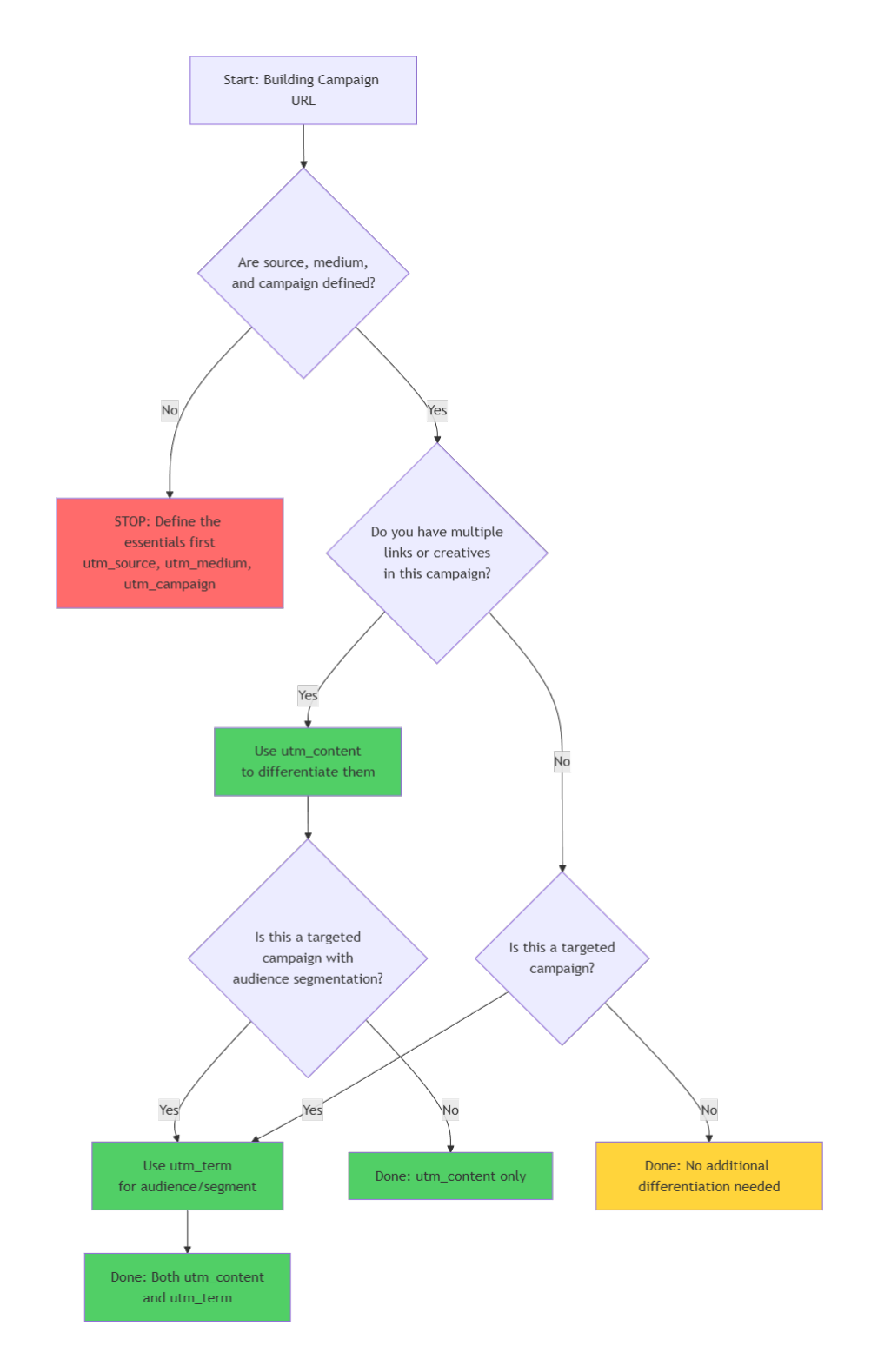
Decision Flowchart: Should I Use utm_content, utm_term, or Both?
Use this flowchart to quickly decide which parameters to use for any campaign: (click to enlarge - right click to open in a new tab)
How to Use This Flowchart
- Start with the essentials - Never proceed without
utm_source,utm_medium, andutm_campaign - Ask about creative variations - Multiple CTAs, ad creatives, or placements → use
utm_content - Ask about targeting - Specific audience, segment, or keyword → use
utm_term - Combine when needed - Targeted campaign with multiple creatives → use both
Quick Examples Using the Flowchart
Scenario 1: Email newsletter (general broadcast, 3 article links)
- ✅ Essentials defined
- ✅ Multiple links → Use
utm_content - ❌ No targeting → Skip
utm_term - Result: utm_content only
Scenario 2: Facebook ad (lookalike audience, single creative)
- ✅ Essentials defined
- ❌ Single creative → Skip
utm_content - ✅ Targeted audience → Use
utm_term - Result: utm_term only
Scenario 3: LinkedIn campaign (retargeting, testing 2 images)
- ✅ Essentials defined
- ✅ Multiple creatives → Use
utm_content - ✅ Targeted audience → Use
utm_term - Result: Both utm_content and utm_term
Real-World Examples Across Channels
Example 1: Email Newsletter (General Broadcast)
Scenario: Weekly newsletter sent to entire list with 3 article links
utm_source=newsletter
utm_medium=email
utm_campaign=weekly_digest_2026_02_19
utm_content=article_01_link
Second article link in same email:
utm_content=article_02_link ← Changed to differentiate
Why this setup:
- ✅ No
utm_termbecause it's a general broadcast (no segmentation) - ✅
utm_contentdifferentiates which article drove the click - ✅ In GA4, you can see which articles get the most engagement
Example 2: LinkedIn Ad (Retargeting Campaign with Video)
Scenario: Video ad shown to people who visited your pricing page
utm_source=linkedin
utm_medium=paid_social
utm_campaign=webinar_promo_feb
utm_term=retargeting_pricing_visitors_14d
utm_content=video_speaker_intro_30s
Testing a different creative to the same audience:
utm_term=retargeting_pricing_visitors_14d    ← Same audience
utm_content=image_agenda_preview             ← New creative
Why this setup:
- ✅
utm_termspecifies the retargeting audience - ✅
utm_contentidentifies the creative format - ✅ In GA4, you can compare video vs. image performance for this audience
Example 3: Instagram Organic Post
Scenario: Behind-the-scenes Instagram story with link sticker
utm_source=instagram
utm_medium=organic_social
utm_campaign=behind_the_scenes_series
utm_content=story_swipe_up
Why this setup:
- ✅
utm_contentspecifies it was a story (vs. feed post or bio link) - ❌ No
utm_termbecause organic posts have no targeting - ✅ Simple, clean tracking for organic content
Example 4: Influencer Partnership (Paid)
Scenario: Paying influencer to post product demo to their audience
utm_source=instagram
utm_medium=paid_social
utm_campaign=influencer_partnership_q1
utm_term=influencer_sarah_johnson
utm_content=reel_product_unboxing
Why this setup:
- ✅
utm_termidentifies which influencer posted (for ROI per influencer) - ✅
utm_contentspecifies the content format (reel) - ✅ In GA4, you can calculate which influencer drives the best ROI
Example 5: Google Ads Search Campaign (Manual Tagging)
Scenario: Brand defense search campaign (manual UTMs instead of auto-tagging)
utm_source=google
utm_medium=cpc
utm_campaign=brand_search_defense_q1
utm_term={keyword}
utm_content=rsa_variation_02
Why this setup:
- ⚠️ Only use manual tagging if auto-tagging (gclid) is disabled
- ✅
utm_term={keyword}uses Google's dynamic keyword insertion - ✅
utm_contenttracks which responsive ad variation performed better
Better approach: Enable auto-tagging and skip manual UTMs entirely.
Example 6: Display Ad (Contextual Targeting)
Scenario: Banner ads on tech blogs via Google Display Network
utm_source=google_display
utm_medium=display
utm_campaign=brand_awareness_tech_audience
utm_term=contextual_saas_marketing_blogs
utm_content=leaderboard_728x90_animated
Testing a different banner size:
utm_term=contextual_saas_marketing_blogs    ← Same targeting
utm_content=rectangle_300x250_static        ← Different size/format
Why this setup:
- ✅
utm_termspecifies contextual targeting criteria - ✅
utm_contentidentifies banner size and animation type - ✅ In GA4, you can see which placements and formats perform best
Example 7: Affiliate Marketing
Scenario: Partner blog includes your banner ad in their sidebar
utm_source=partner_saasweekly_com
utm_medium=affiliate
utm_campaign=product_launch_partners
utm_content=sidebar_banner_300x250
Different partner, same creative:
utm_source=partner_marketingblog_com    ← Different partner
utm_content=sidebar_banner_300x250      ← Same creative
Why this setup:
- ✅
utm_sourceidentifies the specific partner - ✅
utm_contentspecifies placement and size - ❌ No
utm_termneeded unless you have tiered partners (platinum, gold, silver) - ✅ In GA4, you can compare ROI per partner
GA4 Reporting: How to Actually Use This Data
You've tagged your URLs correctly. Now what? Here's how to access utm_content and utm_term data in GA4.
Method 1: Standard Reports (Quick Analysis)
Step 1: Go to Traffic Acquisition Report
- Reports → Acquisition → Traffic acquisition
Step 2: Add Secondary Dimension
- Click "+" next to dimensions
- Search for "Session manual content" or "Session manual term"
- Add to report
Step 3: Analyze
- Primary dimension: Session source/medium
- Secondary dimension: Session manual content
- Now you can see creative performance within each channel
Example view:
Source/Medium              | Session manual content   | Conversions
---------------------------|-------------------------|------------
facebook / paid_social     | video_testimonial       | 45
facebook / paid_social     | image_lifestyle         | 32
newsletter / email         | hero_cta                | 28
newsletter / email         | footer_link             | 12
What this tells you: The video testimonial outperforms the image creative on Facebook. The hero CTA in emails converts better than footer links.
Method 2: Explorations (Deep Dive)
Step 1: Create Free-Form Exploration
- Explore → Free form
Step 2: Add Dimensions
- Session source / medium
- Session manual term
- Session manual content
- Session campaign
Step 3: Add Metrics
- Sessions
- Conversions
- Conversion rate
- Revenue (if e-commerce)
Step 4: Analyze Combinations
- Rows: Session manual term (audiences)
- Columns: Session manual content (creatives)
- Values: Conversion rate
Example output:
                    | video_ad | image_ad | carousel
--------------------|----------|----------|----------
lookalike_customers |   3.2%   |   2.1%   |   2.8%
retargeting_30d     |   4.5%   |   3.8%   |   4.1%
cold_interests      |   1.8%   |   1.2%   |   1.5%
What this tells you: Retargeting audiences perform better across all creative types. Video ads outperform images for lookalike and cold audiences.
Method 3: BigQuery Export (Advanced)
For teams using BigQuery, manual_content and manual_term are available as nested fields in the event data.
Example query:
SELECT
  traffic_source.manual_term,
  traffic_source.manual_content,
  COUNT(DISTINCT user_pseudo_id) AS users,
  COUNTIF(event_name = 'purchase') AS conversions
FROM
  `project.dataset.events_*`
WHERE
  _TABLE_SUFFIX BETWEEN '20260201' AND '20260228'
GROUP BY 1, 2
ORDER BY conversions DESC
💡 Technical Authority Note
Mentioning BigQuery shows you understand enterprise-level analytics. For advanced teams,
manual_contentandmanual_termare nested fields in thetraffic_sourcestruct, making them queryable for custom attribution models and advanced analysis.
User-Scoped Dimensions: First User Attribution
GA4 also tracks First user manual term and First user manual content, which show the original UTM values that first brought the user to your site.
Use case: Understanding long-term attribution
Example:
- User first arrives via
utm_content=video_adon Jan 15 - They return via
utm_content=email_reminderon Feb 10 and convert
Session-scoped: Conversion credited to email_reminder
User-scoped: Conversion shows first touch was video_ad
When to use user-scoped:
- Multi-touch attribution analysis
- Understanding which initial creative drives eventual conversions
- Calculating long-term ROI of top-of-funnel campaigns
Quick Reference Guide
Use this table for fast decision-making:
| Scenario | utm_content? | utm_term? | Example |
|---|---|---|---|
| Email with 3 CTAs | ✅ Yes | ❌ No | content=cta_01 |
| Email to VIP segment | ⚠️ Maybe | ✅ Yes | term=vip_list&content=hero_cta |
| Paid social to lookalike audience | ✅ Yes | ✅ Yes | term=lookalike&content=video_ad |
| Organic social post | ✅ Yes | ❌ No | content=carousel_post |
| Google Ads (auto-tag ON) | ⚠️ Optional | ❌ No | Auto-tagging handles it |
| Google Ads (auto-tag OFF) | ✅ Yes | ✅ Yes | term={keyword}&content=rsa_02 |
| Display ad (contextual) | ✅ Yes | ✅ Yes | term=tech_blogs&content=banner_728x90 |
| Partner/affiliate link | ✅ Yes | ⚠️ Maybe | content=sidebar_banner |
| Influencer post | ✅ Yes | ✅ Yes | term=influencer_name&content=story |
| QR code (print ad) | ✅ Yes | ❌ No | content=print_ad_pg3 |
| Generic newsletter broadcast | ✅ Yes | ❌ No | content=article_link_01 |
| A/B test email subject | ✅ Yes | ❌ No | content=subject_a_urgency |
| Retargeting campaign | ✅ Yes | ✅ Yes | term=cart_abandoners&content=dynamic_product |
The UTM Guard Checklist: Preventing Common Errors
Before launching any campaign, run through this checklist to avoid the mistakes that fragment your data:
Pre-Launch Validation
- Essentials first:
utm_source,utm_medium, andutm_campaignare defined - Case consistency: All values are lowercase
- No PII: No email addresses, names, or user IDs in any parameter
- No duplication:
utm_termandutm_contentdon't repeat campaign name - Proper parameter choice:
utm_contentfor creative/placement (what)utm_termfor audience/targeting (who)
- Skip when not needed: Not using
utm_termon non-targeted campaigns - Delimiter consistency: Using hyphens OR underscores consistently (not mixed)
- No spaces or special characters: Values use
_or-, not spaces - Descriptive values: Names clearly identify the element (not
link1,test,v2)
Platform-Specific Checks
- Google Ads: Auto-tagging enabled (skip manual
utm_termif using gclid) - Meta Ads: Manual UTMs added even with fbclid auto-tagging
- Email:
utm_termonly used for list segmentation (not subject tests) - Organic social: No
utm_termunless tracking influencer/partner
Testing
- Click the URL and verify parameters survive redirects
- Check GA4 Realtime to confirm tracking works
- Verify case matches across all campaign URLs
- Run through UTM Guard validator for automated checks
Summary: The Framework You Can Actually Use
The core principle:
- utm_content = What they clicked (creative, CTA, placement)
- utm_term = Who was targeted (audience, segment, keyword)
The hierarchy:
- Essentials (always): source, medium, campaign
- Optimizers (when needed): content, term
The decision process:
- Start with essentials
- Ask: "Multiple creatives or placements?" →
utm_content - Ask: "Targeted audience or segment?" →
utm_term - Use both when you need creative AND audience analysis
The privacy rule:
- Never use PII in any UTM parameter
The consistency rule:
- Lowercase everything
- One delimiter (hyphen or underscore)
- Same values = same casing
The validation rule:
- Test before launch
- Check GA4 Realtime
- Run through UTM Guard
With this framework, you'll never again look at a conversion in GA4 and wonder whether it came from the $10,000 video or the text ad you made in 10 minutes.
You'll know. And you'll optimize accordingly.
Next Steps
- Validate your campaign URLs now - Automated checks for utm_content and utm_term misuse
- Review UTM best practices - Complete UTM strategy guide
- Fix your channel grouping - Understand how source/medium affect categorization
- Prevent tracking issues - Pre-launch validation checklist
- Troubleshoot broken tracking - Fix UTM issues in 5 minutes
UTM Guard helps marketing teams prevent tracking mistakes before launch. Validate campaign URLs in seconds, catch common errors automatically, and ensure accurate attribution in GA4. Stop guessing which creatives work—start measuring them.
FAQ
What's the difference between utm_content and utm_term?
utm_content identifies what was clicked (creative, CTA, placement), while utm_term identifies who was targeted (audience segment, keyword, list). Think of content as 'the message' and term as 'the targeting.'
Can I use utm_term for non-search campaigns?
Yes. While utm_term was originally designed for paid search keywords, it's now industry standard to use it for audience segments on paid social, email list segmentation, and display targeting criteria.
Do I need both utm_content and utm_term?
Only if you're both targeting a specific audience AND tracking multiple creatives/placements. Many campaigns only need one or neither. Always prioritize utm_source, utm_medium, and utm_campaign first.
Will using utm_content affect my GA4 channel grouping?
No. Only utm_source and utm_medium affect GA4's default channel grouping. utm_content and utm_term provide additional detail within channels but don't change how traffic is categorized.
Can I put personally identifiable information in utm_term?
Absolutely not. Never use PII (email addresses, user IDs, names) in any UTM parameter. This violates privacy policies and can result in your entire GA4 property being deleted.
How do I view utm_content and utm_term data in GA4?
In standard reports, add 'Session manual content' or 'Session manual term' as secondary dimensions in the Traffic Acquisition report. For deeper analysis, use Explorations with these dimensions, or query the BigQuery export where they appear as nested fields.
Related reading
UTM Parameter Best Practices for 2026: A Complete Guide
Master UTM parameters with 2026 best practices. Learn naming conventions, avoid mistakes, and build a taxonomy for clean GA4 data.
UTM Tracking in a Privacy-First Era: What Still Works in 2026
Learn how Apple ATT, Link Tracking Protection, browser privacy controls, and modern attribution challenges impact UTM tracking—and why campaign metadata remains critical in 2026.
How to Prevent UTM Tracking Issues: The Complete Pre-Launch Checklist
Stop UTM tracking problems before launch. Comprehensive checklist for URL validation, testing, and monitoring to ensure accurate GA4 attribution.